← Back Data Marketplace

Data Marketplace

Shipping Halliburton's first unified data platform through an AI-native design-to-code pipeline.

Role
Lead UX, sole designer
Core team
3 engineers, PO, AI lead, Technology Director
Research
10 participants across 4 roles
Timeline
2025–2026
Status
Shipped, in active use
This project is under NDA. Sensitive details are blurred. General process and approach are shown.

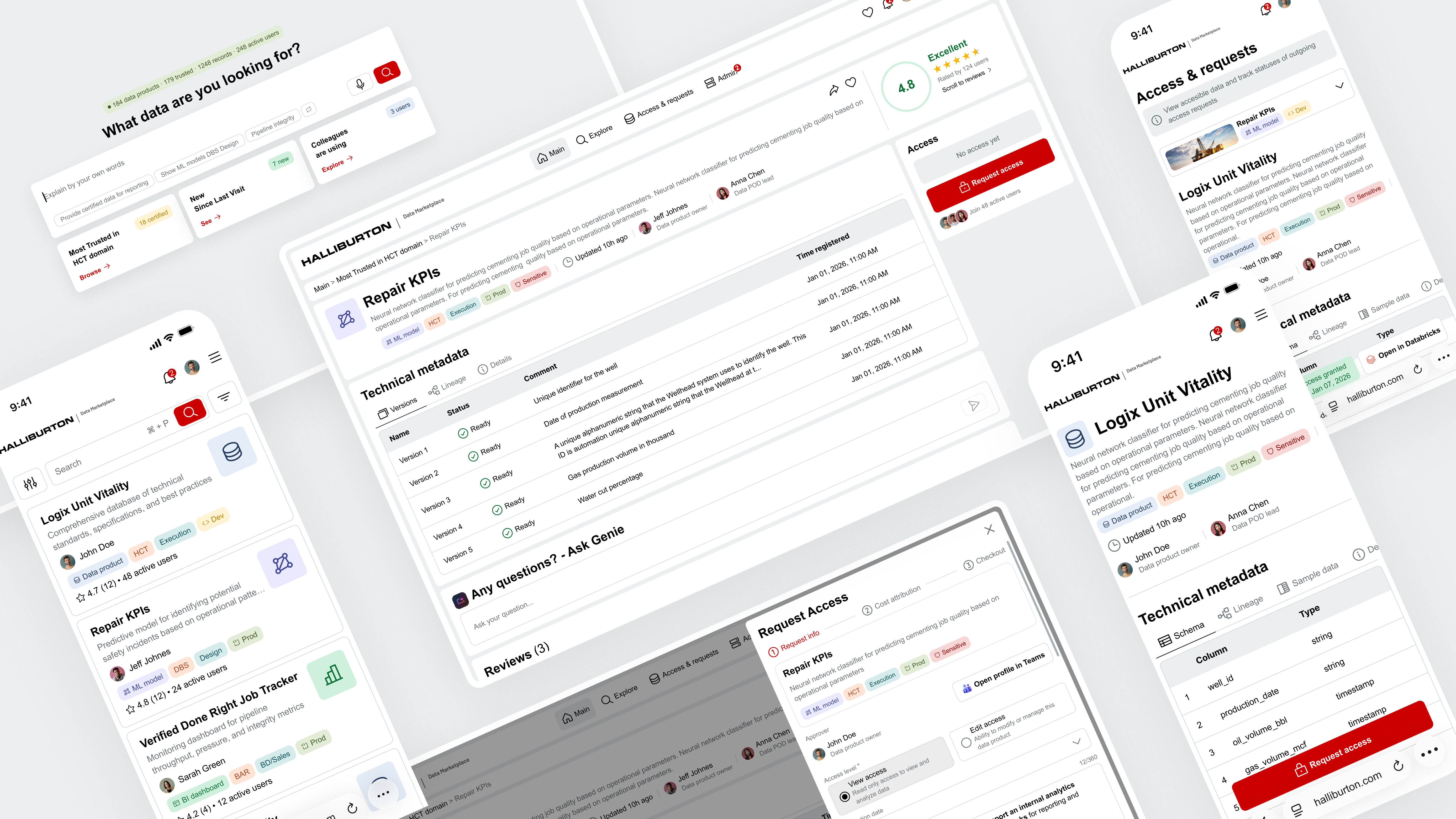
The first tool at Halliburton where engineers can find, trust, and access any data asset in minutes.


Data Marketplace — project overview

From days of searching to minutes of finding

Problem

Scattered and unfindable

Data assets live across disconnected systems with inconsistent metadata and unclear ownership.

Goal

One entry point

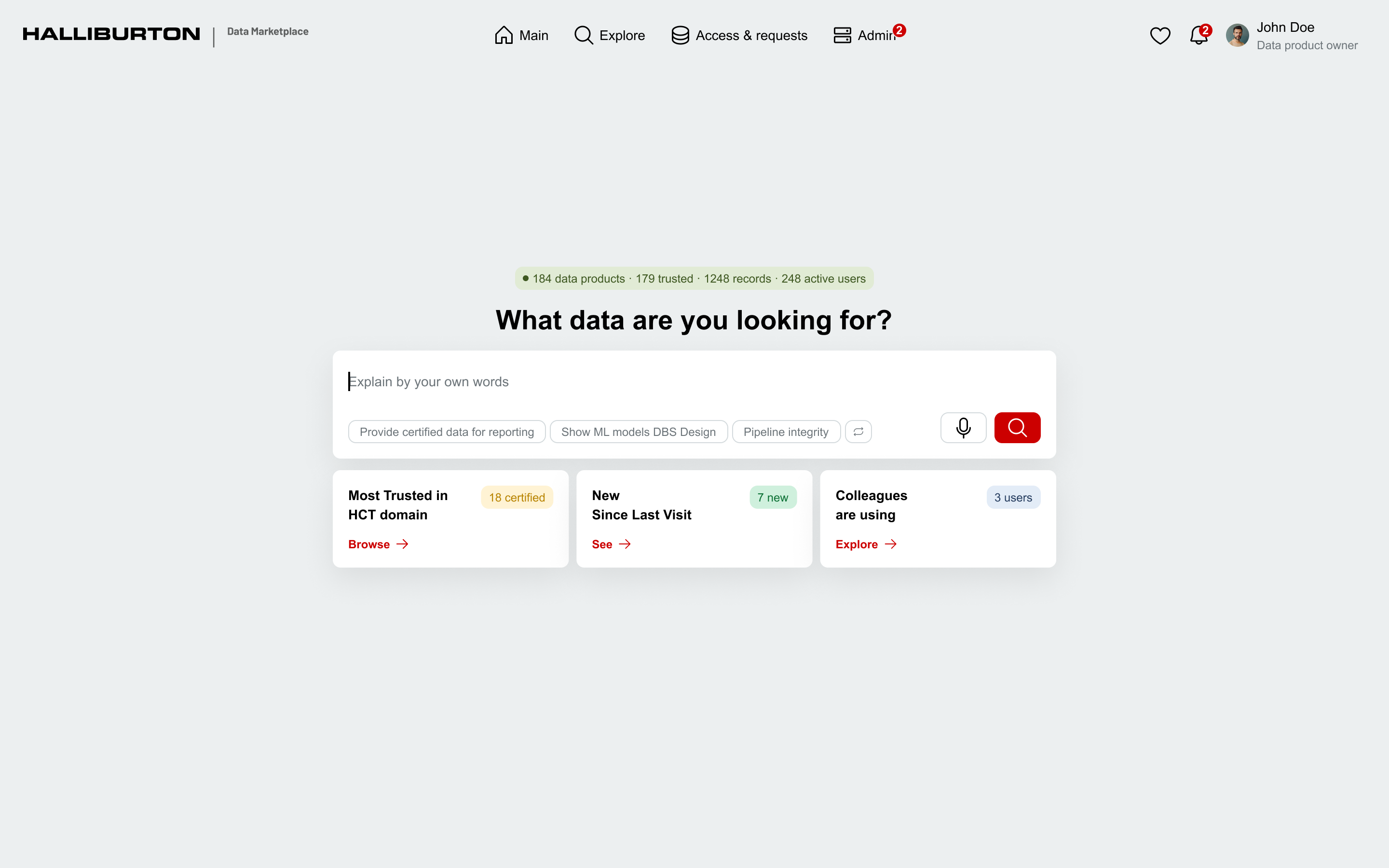
A unified marketplace for curated data, reports, models, and AI agents — part of Halliburton's Data Ribbon.

Success

Minutes, not days

Engineers find, validate, and request access to any data asset in under a few minutes.

From vision to shipped product

1.0

Discovery

Aligned with the Technology Director and AI lead on vision, then defined two product phases — MVP and Trust/AI — so the design system could scale without rework.

2 strategies · 1 foundation

2.0

Research

Mapped 4 persona groups, 5 user flows, user journey maps, and the information architecture that later powered the MCP hand-off.

4 personas · 5 flows · IA

3.0

Prototype & Design System

Started with AI-generated prototypes to validate structure fast, then built a scalable design system with reusable tokens and components.

AI prototype · Figma system

4.0

Validation

Two rounds of testing with real users — Data POD Leads and Product Owners. Caught blind spots before a single line of code was written.

2 rounds · 10 users

5.0

Hand-off to Dev

Connected dev team to Figma through an MCP server. Developers pulled specs, tokens, and components directly into their IDE — no screenshots, no outdated docs.

Figma MCP · live specs

6.0

Post-launch Research

Tracked adoption, task success, and friction points after launch. The platform keeps evolving based on real usage data.

Analytics · iteration

Two phases of product evolution

UX strategy is a long-term plan that connects user insights, product vision, and business objectives into a coherent direction for designing and improving the user experience.

Phase 1 established the foundation — a single marketplace where engineers can find, trust, and access any data asset. The focus was on structure, clarity, and core workflows before layering in AI and social.

Vision & Problem
VisionProvide a user-friendly means of accessing curated, trusted data, reports, models, and AI Agents that are a part of Halliburton's Data Ribbon.
ProblemUsers cannot efficiently work with data because it is difficult to find, difficult to access, and not easy to compare across multiple sources.
Success looks likeData engineers use the dashboard daily as the primary entry point to find, validate, request access, and consume data assets within minutes — not days or weeks.
Persona groups
G1

Data Scientist / Engineer

Browse data products, fast and relevant search, preview data, request & obtain access quickly.

G2

Business User

Find existing reports across BI tools that answer questions from trusted data.

G3

Data Product Owner

Manage data product info, approve/reject accesses, define level of access.

G4

Data POD Lead

Oversee data products across teams, monitor quality and access patterns.

UX Goals
  • Help users find the right data product quickly
  • Make data product cards and details easy to understand
  • Simplify the access request flow
  • Make access statuses and permissions clear
  • Differentiate View and Edit access levels clearly
  • Enable product owners to add and manage products with minimal friction
Core user scenarios
  • Search and discover relevant data products
  • Filter and narrow down data products
  • Open dataset detail page and understand if it's usable
  • Request and get 1-click access directly from dataset page
  • Track access request status
  • Compare data sets
  • Add and manage data products
  • Manage access levels
UX Principles
  • Reduce cognitive load — engineers already drown in data; the UI shouldn't add noise.
  • Trust over decoration — every element earns its place; metadata, status, and lineage come first.
  • Speed as a feature — every flow optimised for “minutes, not days.”
  • Desktop-first — users live in multi-window data environments.
Success metricsNDA
Roadmap — 7 phases, 18 monthsNDA
Key deliverables

What I delivered end-to-end on this project:

  • UX strategy for 2 product phases
  • Personas (4 groups)
  • User journey maps
  • Jobs-to-be-done
  • User flows (5 flows)
  • Information architecture
  • Wireframes and mockups
  • Interactive prototype
  • Scalable design system
  • 2 rounds of usability testing reports
  • Post-launch research report

Phase 2 transforms the marketplace from a browsing tool into a trust-driven, AI-powered discovery platform. Users describe what they need in plain language, see ranked results they can trust, and make access decisions with confidence.

Vision & Problem
VisionTransform the Data Marketplace from a browsing tool into an intelligent, trust-driven data discovery platform powered by AI.
ProblemUsers can find data but cannot judge if it's reliable, relevant, or safe to use. Discovery is manual, trust signals are absent, and social knowledge is invisible.
Success looks likeEngineers and business users describe what they need in plain language, receive ranked trusted results in seconds, and make access decisions confidently.
Structural changes
Phase 1 → 2The existing browse experience moves to a secondary role. A new AI-powered entry point takes its place — built around intent rather than navigation.
UX Goals
  • Reduce time to find the right data product from weeks to minutes
  • Give users confidence to trust data before requesting access
  • Make approval decisions faster for owners
  • Surface peer knowledge that currently lives only in people's heads
  • Support both technical and business user journeys
AI capabilitiesNDA
Feature clustersNDA
Success metricsNDA

Understanding users and their journeys

Deep research phase to map out who uses the platform, how they interact with it, and where the friction points are. 4 persona groups, detailed user flows, and end-to-end journey maps shaped every design decision.

G1

Data Scientist / Engineer

WhoTechnical specialist working with Python, ML models, and data integrations.
PainHard to find datasets across sources; long approval cycles; unclear ownership.
G2

Business User

WhoAnalysts, PMs, and business stakeholders using BI tools.
PainToo much raw data, too few curated business-ready reports; hard to trust freshness.
G3

Data Product Owner

WhoProduct manager responsible for governance and lifecycle of data products.
PainFragmented ownership; too many manual approval steps; slow onboarding.
G4

Data POD Lead

WhoTeam/Tech Lead for a data engineering POD or domain.
PainHeavy manual documentation work; poor visibility into who uses their products.

From AI brainstorm to production-ready screens

Instead of jumping straight into pixel-perfect mockups, I started with an AI-based prototype to quickly test concepts, layouts, and interaction patterns. This let me brainstorm and validate what works and what doesn't — before investing time in high-fidelity design.

Once the structure was proven, I built a scalable design system with reusable components, tokens, and patterns — then created the final mockups for the dev team.

AI prototype approach

Used AI tools to rapidly generate and iterate on layout concepts, testing different approaches to search, filtering, data cards, and access flows. This phase was about speed and exploration — finding the right direction before committing to a design system.

Multiple iterations across layout, search, filtering, and access flow concepts — tested structurally before any high-fidelity work began.

Final mockups

Three-tier token architecture

One system, two themes, zero duplication. Every color in the product traces through three layers — primitives at the base, semantic tokens that swap between light and dark modes, and component tokens that apply them consistently.

Primitives
red-50 #CC0000
white #FFFFFF
black #000000
grey-5 #ECEFF0
grey-20 #D4DADD
grey-50 #7F878D
grey-60 #6D757A
grey-95 #1E2224
green-10 #CFF0DD
green-70 #0C7135
orange-70 #A94722
blue-10 #E3ECF7
Semantic
primary-background #CC0000
primary-foreground #FFFFFF
secondary-foreground #000000
secondary-background #ECEFF0
surface-background #FFFFFF
surface-bg-muted #ECEFF0
surface-foreground #000000
surface-fg-muted #6D757A
border-default #D4DADD
border-strong #7F878D
border-focus #1E2224
success-background #CFF0DD
success-foreground #0C7135
warning-foreground #A94722
data-bg #E3ECF7
Component
button/primary/bg
button/primary/text
button/secondary/text
button/secondary/bg
body/background
page/page-bg
content/text
input/text-title
input/border-default
input/border-hover
input/border-focused
statuses/success-bg
statuses/success-text
statuses/warning-text
data product/bg

~158 primitive · ~45 semantic · ~459 component tokens across 2 themes. Showing a selection of key chains.

Testing with the people who'd actually use it

Before moving to development, I ran two structured feedback sessions with the primary user groups — validating designs, aligning on roles and workflows, and catching blind spots early.

Session 1 — Data POD LeadsNDA

Design review & feedback session with Data POD Leads — the technical owners who create and maintain data products on the internal data platform. Focused on validating roles, publishing workflows, and access management.

Protected under NDA

Key takeaways

  • Overall Marketplace concept is supported
  • Clear separation between POD Lead and Data Product Owner responsibilities
  • Automation-first approach validated
  • Access management should be user-centric
  • Sensitivity column removed from UI
  • Dev access management remains an open exploration topic
Session 2 — Data Product OwnersNDA

Design review & feedback session with Data Product Owners — the business owners of data products, responsible for final approval and publication decisions. Focused on publication flow, access governance, and role alignment.

Protected under NDA

Key takeaways

  • Overall Marketplace concept is supported
  • Clear separation between technical and business ownership
  • Access management should be user-centric with clear access reasons
  • Publication and access decisions should stay lightweight
  • Marketplace enables confident decisions without exposing technical complexity

AI-powered design-to-code pipeline

Traditional hand-off means screenshots, redlines, and a PDF that's out of date the moment you save it. On this project, I tried something else: connect developers directly to the Figma design system through MCP — Model Context Protocol — so they could pull component specs, tokens, and interaction states from their IDE in real time. No more guessing from static docs.

Traditional vs MCP Pipeline

Traditional hand-off

  • Static specs in Figma
  • Screenshots in tickets
  • Dev asks designer for clarification
  • Components drift from source over time

MCP pipeline

  • Live component specs pulled from Figma
  • Tokens synced automatically to code
  • Dev queries the design system from the IDE
  • One source of truth, always current

How it flows

Figma file Design system, tokens, variables
MCP server Structured data layer
Claude Code / IDE Live queries from dev environment
Production code Components built 1:1 with design

What this looks like in code

Every prop, every style, every token — traced back to a Figma variable. Update the variable in Figma, and the next sync updates the code.

// Component generated via MCP pull from Figma <Button variant="primary" size="md" background="var(--color-primary-background)" // → Figma: primary-background color="var(--color-primary-foreground)" // → Figma: primary-foreground radius="var(--radius-md)" // → Figma: radius-md > Request access </Button>

Generic example — structure shown, real component names under NDA.

How MCP + Figma worked
ConnectionMCP server connected to Figma file, exposing the design system as structured data that dev tools could consume in real time.
ComponentsDevelopers accessed component specs, props, variants, and usage guidelines directly from their IDE — no context switching to Figma.
TokensDesign tokens (colors, typography, spacing, elevation) synced automatically — any update in Figma propagated to code.
ResultSignificantly reduced back-and-forth between design and dev. Components were built accurately on the first pass, matching the design system 1:1.

Result: components delivered significantly faster than traditional handoff cycles — fewer iterations, higher first-pass accuracy.

What made this successful
Structured Figma fileMCP reads layer names, frame structure, and component hierarchy. A well-organized Figma file with clear section naming made the design system legible to the AI — messy files produce messy output.
Token disciplineThree-tier token architecture (primitives → semantic → component) gave MCP a stable interface. Any token change in Figma propagated cleanly to code.
Shared vocabularyDev and design aligned on component names, prop names, and variant terminology up front. Naming consistency turned out to be the biggest unlock.
Iteration speedFewer back-and-forth cycles meant design could iterate on edge cases while dev built the core in parallel.

Launch isn't the finish line — measuring what's next

The platform is currently in active development and heading toward launch. Rather than waiting until go-live to figure out how to measure success, I designed the post-launch research program upfront — combining traditional analytics, modern AI-powered tools, and continuous user feedback.

What we'll measure
AdoptionActive users, onboarding completion rates, and frequency of return visits across all persona groups.
Task successTime-to-find for datasets, search-to-access conversion, and first-attempt success rate for access requests.
SatisfactionIn-product micro-surveys and follow-up interviews triggered by key user actions.
Pain pointsFriction identified through AI-summarized session replays, support tickets, and heatmap analysis.
Modern research stack
Analytics copilotNatural language queries across usage data to spot trends and cohorts faster than manual dashboards.
AI session replayLLM-generated insights from user sessions instead of watching hundreds of recordings manually.
Continuous interviewsWeekly short conversations with real users, built into the process rather than run as one-off studies.
Feedback synthesisCombining survey responses, support tickets, and interviews into themed insights automatically via LLM synthesis.
Feedback-driven iteration
ListenCollect feedback through multiple channels — surveys, session replays, interviews, and support tickets.
SynthesizeTheme the findings and prioritize by impact on user tasks and business goals.
ShipIterate on the most critical friction points in fast, focused cycles.
ValidateRe-measure to confirm the change actually moved the metric.

Built, validated, ready to ship

The platform is built, validated with real users, and handed off for final development. Launch is weeks away.

What's already in place: a three-tier design system with dev-integrated MCP pipeline, a two-phase UX strategy, two rounds of stakeholder validation, and a tested Figma-to-code workflow that's already producing components 1:1 with the design system.

What I learned along the way

What I'd do differently

Involve data governance stakeholders earlier in the process. Their requirements only became clear mid-project, which meant reworking parts of the access request flow that were already in motion.

What this project taught me

Leading a project end-to-end as the only designer taught me that seniority isn't about headcount — it's about owning decisions across the whole stack. And AI in the design process isn't magic, it's leverage — it speeds up the parts you already understand well, and it's useless for the parts you don't. The best outcomes came when I knew exactly what I wanted before asking for it.

What I'm taking forward

The Figma + MCP pipeline is going into every project from here. Once you've shipped components 1:1 with the design system on the first pass, traditional hand-off feels broken.

Next case → Dogly — Mobile App
01 Problem 02 Process 03 UX Strategy 04 Research 05 Prototype 06 Validation 07 Hand-off 08 Post-launch 09 Outcome 10 Reflection